
Export and Wholesale Prices WhatsApp +971 566 577 588 Call us: +971 600 54 2529
[email protected]
السعد للتكنولوجيا ذ.م.م | Police Approved Security Camera CCTV Companyالسعد للتكنولوجيا ذ.م.م | Police Approved Security Camera CCTV Companyالسعد للتكنولوجيا ذ.م.م | Police Approved Security Camera CCTV Companyالسعد للتكنولوجيا ذ.م.م | Police Approved Security Camera CCTV Company
  • Home
  • About Us
    • Astech Executive Team
    • Astech SIRA Engineer
    • Astech Technical Team
    • Astech Events
    • Astech Offers
    • Awards
    • Career
    • Videos
    • Clients
  • Products
    • Hikvision
      • CCTV Products
        • Thermal Camera
        • Network Camera
        • Analog Camera
        • NVR
        • DVR
        • Hikvision-Mobile
        • Network Storage
      • NON-CCTV Products
        • Access Control
        • Video Intercom
        • Alarm
      • Accessories
        • Cables
        • Bracket
        • Lens
    • HiLook
      • Front End
        • Analog Camera
        • Network Camera
        • PTZ
      • Back End
        • NVR
        • DVR
        • Kits
    • Toshiba
      • Storage
    • ERD
      • Power Supply
    • CCTV Accessories
      • CCTV Camera Tester
  • Police Approvals
    • Police Approved CCTV Installation
    • Abu Dhabi Police CCTV Guidelines
    • Ajman Police CCTV Guidelines
    • Dubai Police CCTV Guidelines
      • SIRA Guidelines
      • SIRA Technical Specifications for Security Systems
      • SIRA Approved Models
      • SIRA Approved CP Plus Models
      • SIRA Approved Dahua Models
      • SIRA Approved HikVision Models
      • SIRA Approved Traice Models
      • SIRA Approved UNV Models
      • SIRA Approved Firmware
    • Fujairah Police CCTV Guidelines
    • Sharjah Police CCTV Guidelines
      • Sharjah Police CCTV Guidelines
      • Sharjah Pledge
    • UAQ Police CCTV Guidelines
      • UAQ Police CCTV Guidelines
      • UAQ CCTV Installation Guidelines
  • Downloads
    • SIRA
      • Hikvision SIRA Camera Certificate
      • Hikvision SIRA DVR Firmware
      • Hikvision SIRA NVR Firmware
      • Dahua SIRA Camera Certificate
      • Dahua SIRA DVR Firmware
      • Dahua SIRA NVR Firmware
    • Firmware
      • Hikvision Access Control Products
      • Hikvision Alarm Products
      • Hikvision Display & Control Products
      • Hikvision Intelligent Traffic Products
      • Hikvision Mobile Products
      • Hikvision Network Products
      • Hikvision Transmission Products
      • Hikvision Video Intercom Products
    • Download Center
      • CP Plus
      • Dahua
      • Hikvision
      • Panasonic
      • UniView
    • Hikvision
      • Password Reset
    • Dahua
      • Reset Button
    • Panasonic
      • PBX Coding
  • Offers
  • Contact US

Reset Dahua Password

This guide will show you how to export and email your password reset file, for your Dahua Camera System, to us, so we can assist in resetting your password.

Learn More
dahua-password-reset

Our Services

What we can help you with

software icon01

CCTV Installation

Al Saad is an innovative workspace for design and installation of the latest CCTV technologies. We always keep an eye on learning and implementing the latest proven CCTV developments to ensure our clients gets the best, Always! Our certified team of installation engineers and technicians are well trained to ensure a high standard of workmanship.

software icon02

Access Controller

Our system knows who is in and whom to be in. It will help you monitor and protect your business by providing you with full control over who gains access to your building/property. We offer systems ranging from simple one door solutions right through to complex high security access control systems ensuring the level of security you prefer for your premises.

software icon03

PABX System

Our goal is to exceed established performance standards while offering our customers innovative business phone service coupled with the highest customized service. Whether it is a small or large enterprise, we have the best for you. From affordable entry-level business phone systems to those with advanced applications, We offers a complete range of digital and IP phones.

software icon04

Structured Cabling

With a strong portfolio of innovative technology solutions and an experienced team of professionals and engineers, Al Saad is equipped to help customers with any networking project. We customize our products and services to meet the specific needs of the individual sectors we do business with.

software icon05

Time Attendance

We are specialists in Biometric Access Control Systems, Finger print Time Attendance, Face recognition Systems, Finger Print Door Access and suppliers of Complete Biometric Solutions. We provide tailored access control solutions to suit your individual business needs.

software icon06

CCTV AMC Service

Annual maintenance contract is an effective solution for managing the service or systems to function properly in an establishment. In the world of competition, quality is a vital factor. To get the same performance from the machines or computer or other accessories, the maintenance is much required.
Technology Expertise

Technology Expertise

Dahua Password Reset

If you lost the password and can’t have access to your DVR, here you can find different methods to recover your device to use the Dahua default password. All depends on the model you have, perhaps the solution for your problem it’s right here, just keep reading.

To reset a Dahua DVR and recover the admin password, you just need to either use a reset button located on the motherboard, try a default password or use a software to generate a new password based on the device date.

dahua password reset button
Dahua DVR reset button 01
Dahua-DVR-reset-button-02

Power Off

OPEN DEVICE

PRESS RESET

POWER ON

NEW PASSWORD

Key solutions

Dahua Password Reset

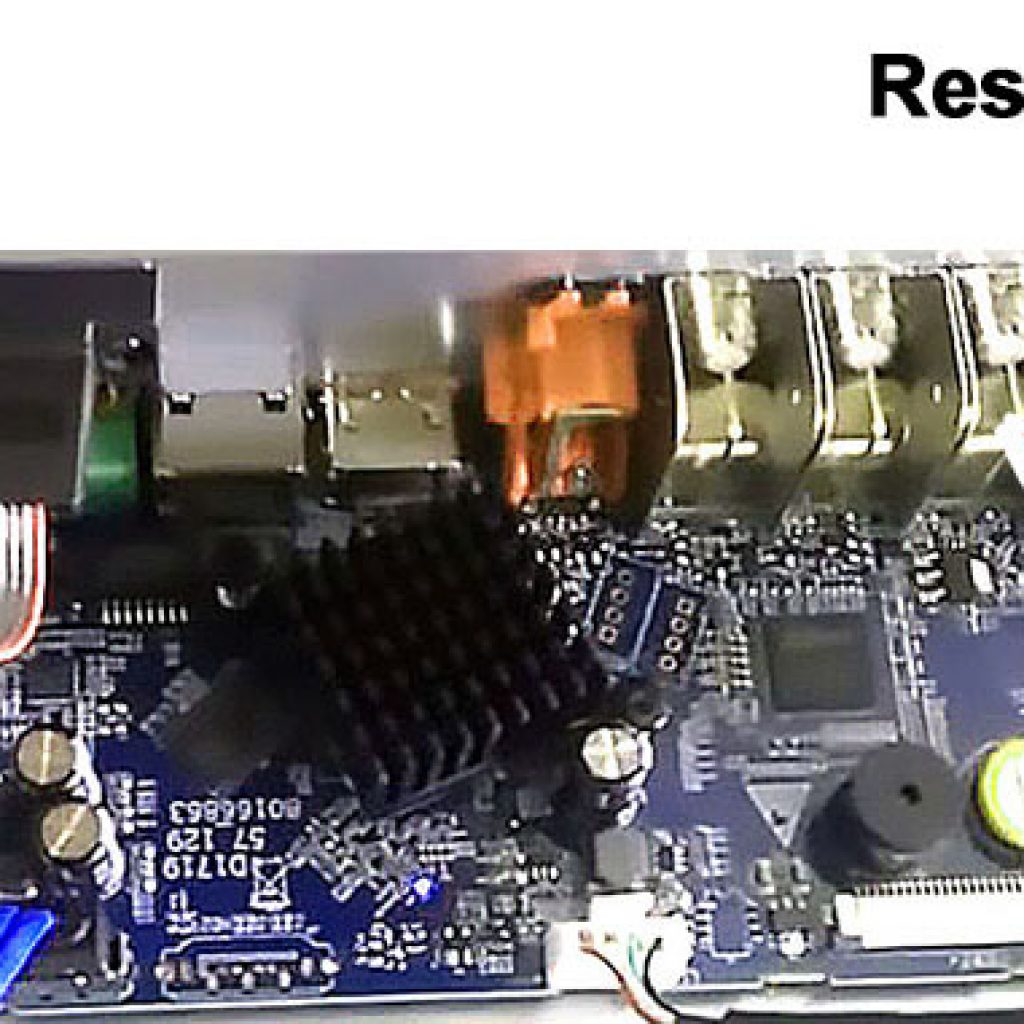
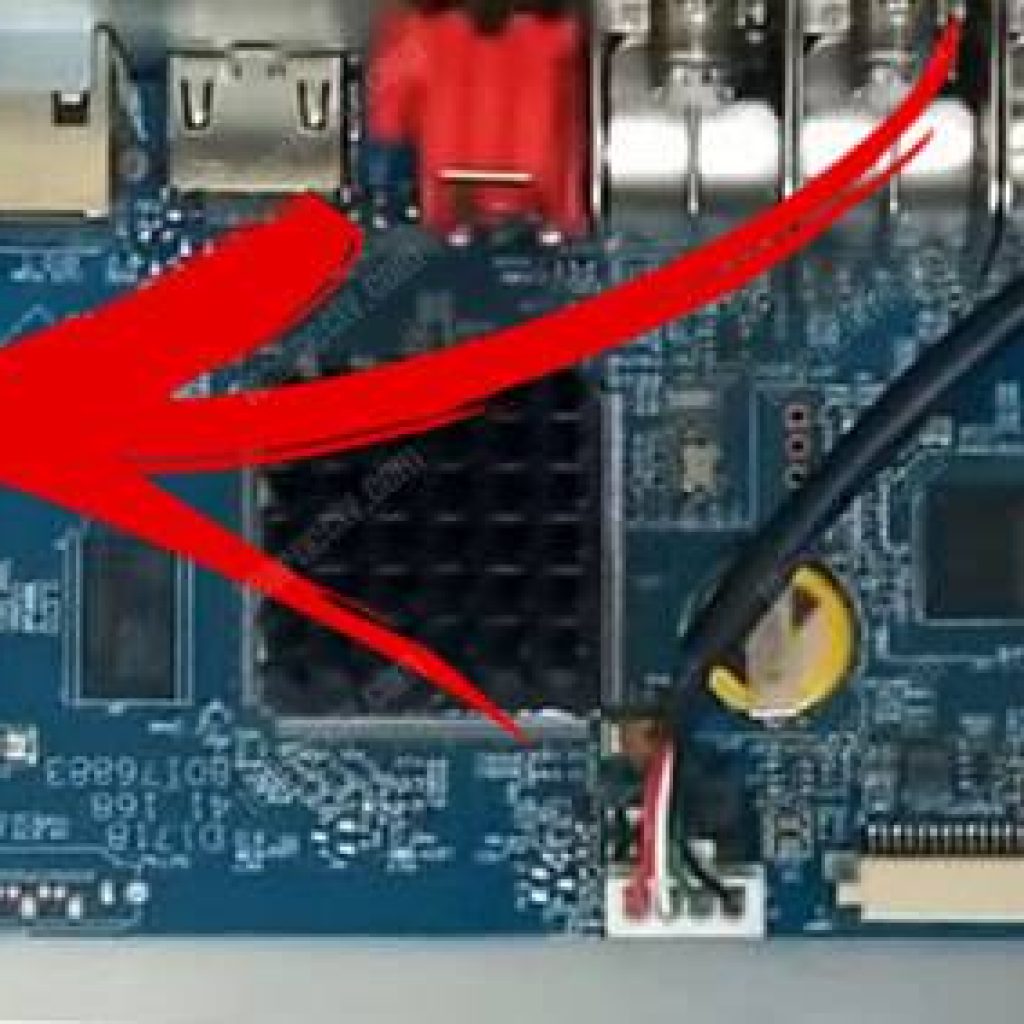
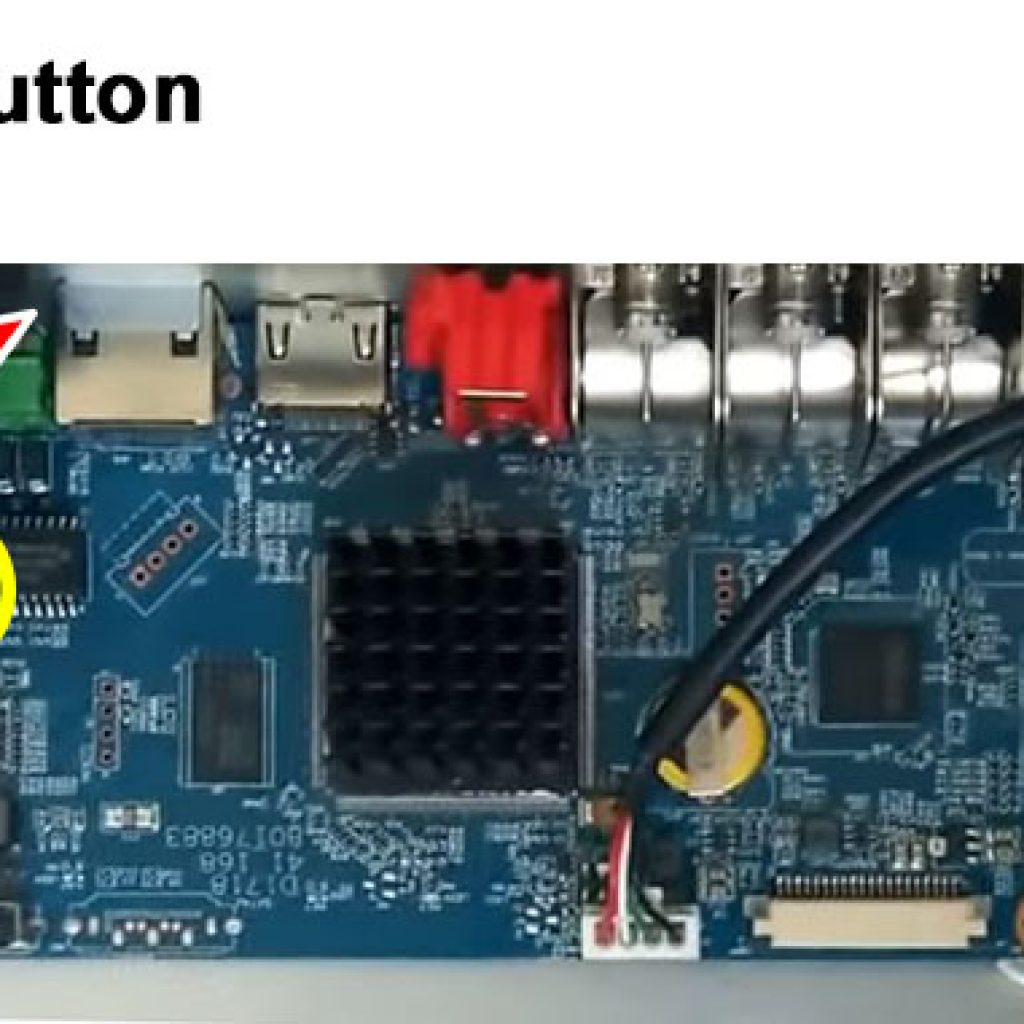
This method will depend on the DVR you have, some of them come with a reset button that is located on the motherboard. you just need to open your device to check if that’s your case. See the following pictures that show such button.

Note that in this DVR model there’s a yellow battery at the right side and a reset button located at the opposite (right) side of the motherboard.

In this model, the yellow battery and the reset button are located at the right side of the motherboard, pretty close of each other.

POWER OFF

OPEN DEVIcE

PRESS RESET

POWER ON

NEW PASSWORD

Key solutions

The password reset procedure

To reset the DVR to factory default just follow the steps:

1. Power off the DVR

2. Press and Hold the button

3.Power on the DVR

4. Keep the reset button passed for 30s

5. Create a new password for the admin account

The process must be done exactly this way. Just make sure you have a monitor attached to the DVR and the power cable is disconnected before starting the process (step 1) and connect the cable while holding the reset button.

You must hold the button until the DVR resets, which will take around 20 to 30 seconds and you will be able to see this information in the monitor.

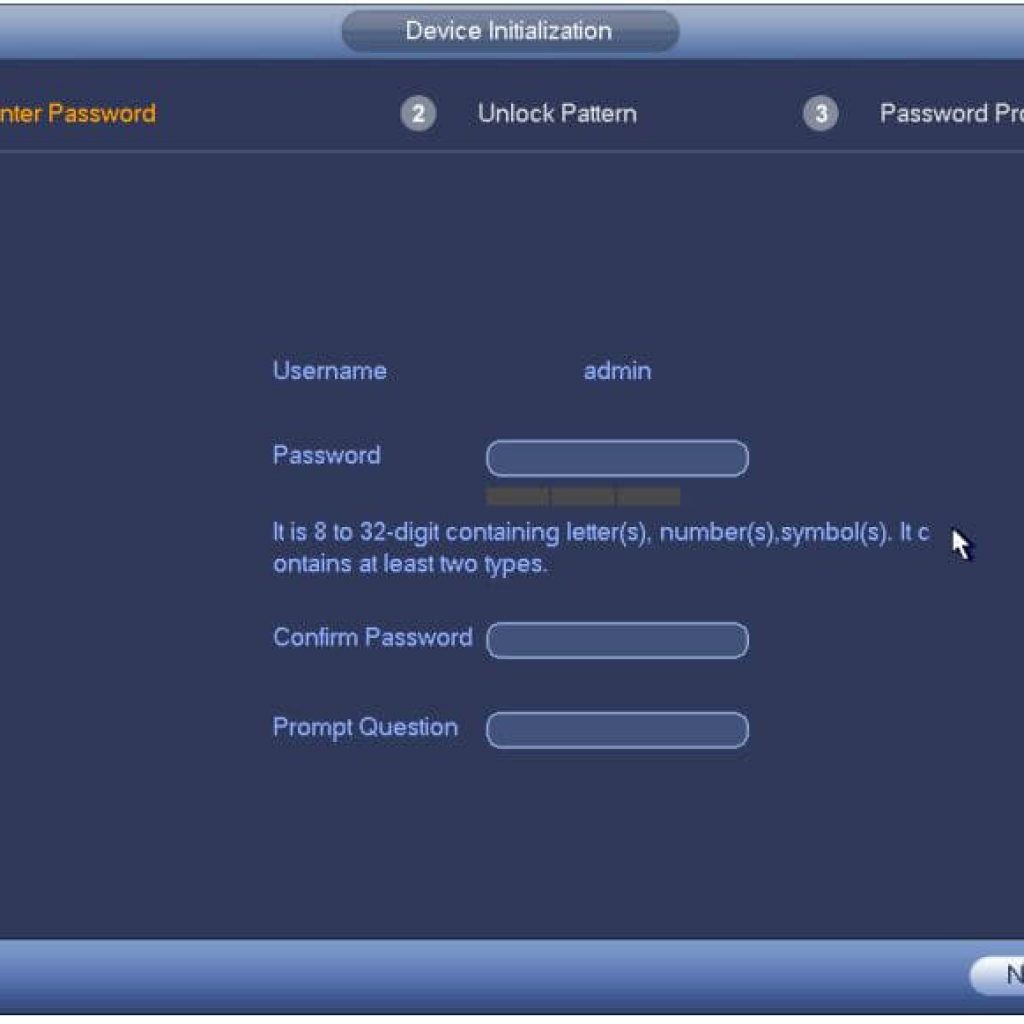
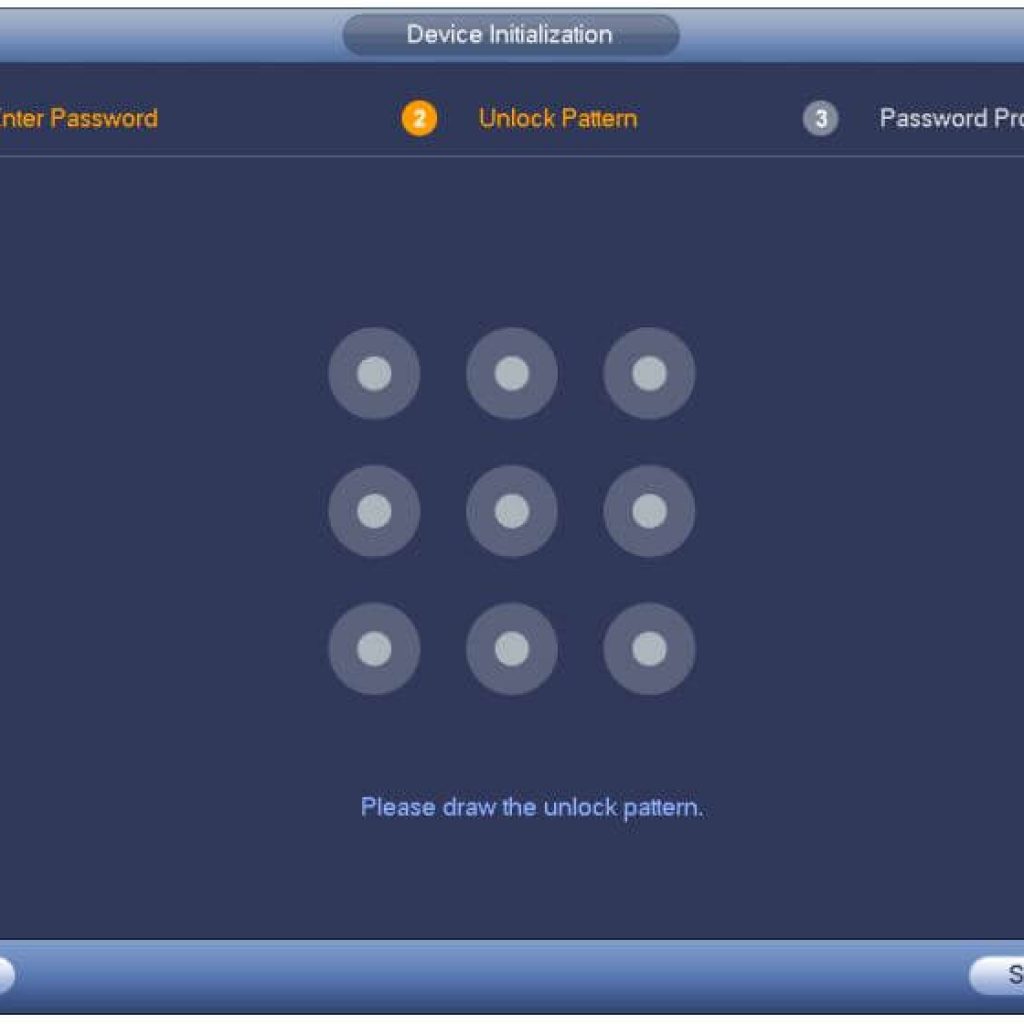
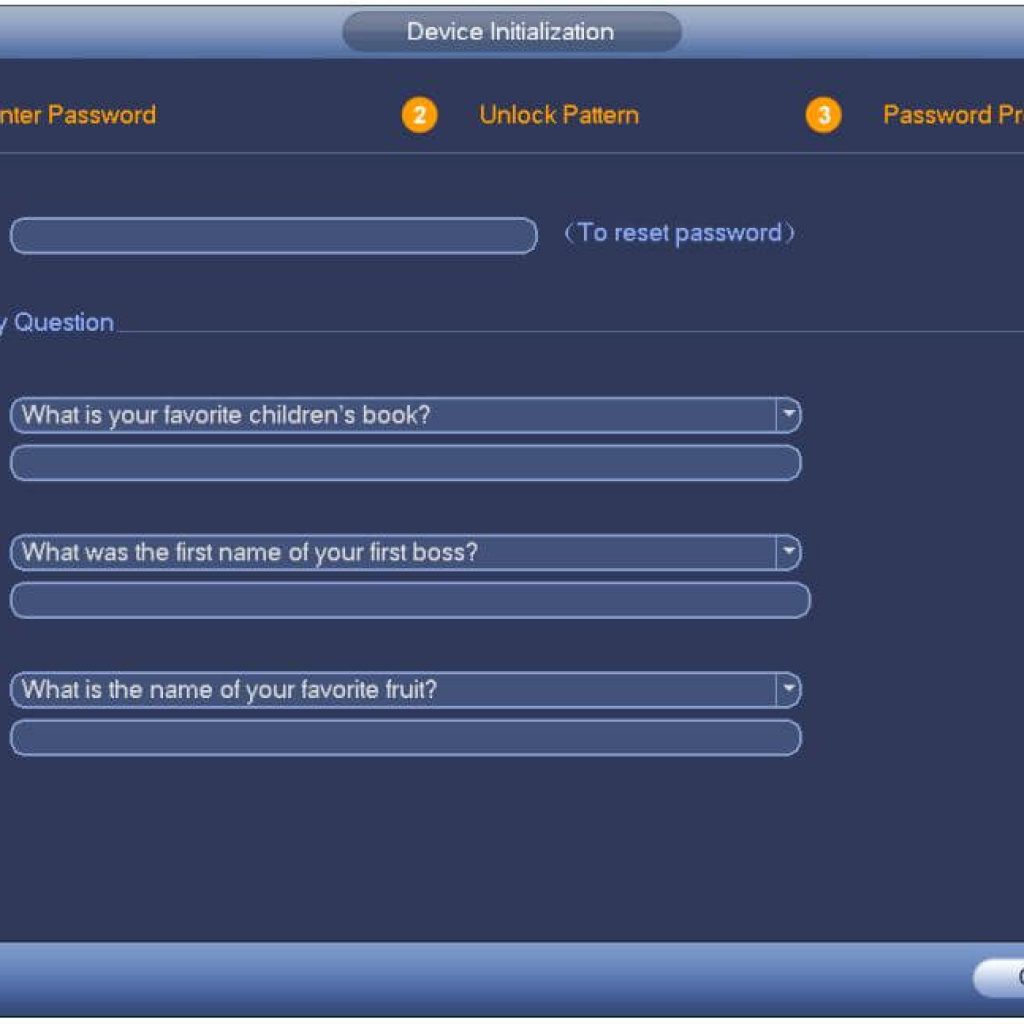
After the reset, the DVR will come back to factory default and ask you to create a new password just like a new installation. See the pictures below:


Dahua DVR Passwrod Setup Screen
Dahua-DVR-Locking-Pattern-Setup-Screen
Dahua-DVR-Security-Question-Screen

In the first screen, just create a new password for your DVR by using a minimum of 8 digits with a combination of letters, numbers, and symbols.

After finishing creating the password click the “NEXT” button

The next step is to create the “Unlock Pattern”

Finally, the last step is to create the security questions just in case you need to reset the password again in the future.

Contact Us

ABOUT US

Al Saad offers full proof solutions to all your security needs! In today’s fast-paced world, we live in perennial fear of being unsafe, and the security of our office premises and homes become essential. With state-of-the-art technology, we bring you the best surveillance systems, guaranteed to maximize security. Certified by the Dubai, Abu Dhabi, Sharjah, Ajman, Umm Al Quwain & Fujairah Police.

OUR SERVICES

  • Hikvision Password Reset
  • CCTV Software Download
  • Time Attendance
  • PABX
  • Structured Cabling
  • Networking
  • Annual Maintenance Contract
  • Hikvision Shop
  • HiLook Shop
  • Order On WhatsApp

Police Approval

Abu Dhabi Police Approved CCTV Installer

Ajman Police Approved CCTV Installer

Dubai Police Approved CCTV Installer

Fujairah Police Approved CCTV Installer

Sharjah Police Approved CCTV Installer

UAQ Police Approved CCTV Installer

CONTACT US

HEAD OFFICE
Shop No. 1, Al Guwair 2 Building،
Al Zahra Street, Rolla,
Sharjah. PO 60953
EMAIL
[email protected]

CUSTOMER CARE
+971 600 54 2529

CELL PHONE
+971 556 22 5447

SUPPORT
+971 507 89 2737

Copyright 2019 - 2021 The Search Ads | All Rights Reserved
  • Home
  • About Us
    • Astech Executive Team
    • Astech SIRA Engineer
    • Astech Technical Team
    • Astech Events
    • Astech Offers
    • Awards
    • Career
    • Videos
    • Clients
  • Products
    • Hikvision
      • CCTV Products
        • Thermal Camera
        • Network Camera
        • Analog Camera
        • NVR
        • DVR
        • Hikvision-Mobile
        • Network Storage
      • NON-CCTV Products
        • Access Control
        • Video Intercom
        • Alarm
      • Accessories
        • Cables
        • Bracket
        • Lens
    • HiLook
      • Front End
        • Analog Camera
        • Network Camera
        • PTZ
      • Back End
        • NVR
        • DVR
        • Kits
    • Toshiba
      • Storage
    • ERD
      • Power Supply
    • CCTV Accessories
      • CCTV Camera Tester
  • Police Approvals
    • Police Approved CCTV Installation
    • Abu Dhabi Police CCTV Guidelines
    • Ajman Police CCTV Guidelines
    • Dubai Police CCTV Guidelines
      • SIRA Guidelines
      • SIRA Technical Specifications for Security Systems
      • SIRA Approved Models
      • SIRA Approved CP Plus Models
      • SIRA Approved Dahua Models
      • SIRA Approved HikVision Models
      • SIRA Approved Traice Models
      • SIRA Approved UNV Models
      • SIRA Approved Firmware
    • Fujairah Police CCTV Guidelines
    • Sharjah Police CCTV Guidelines
      • Sharjah Police CCTV Guidelines
      • Sharjah Pledge
    • UAQ Police CCTV Guidelines
      • UAQ Police CCTV Guidelines
      • UAQ CCTV Installation Guidelines
  • Downloads
    • SIRA
      • Hikvision SIRA Camera Certificate
      • Hikvision SIRA DVR Firmware
      • Hikvision SIRA NVR Firmware
      • Dahua SIRA Camera Certificate
      • Dahua SIRA DVR Firmware
      • Dahua SIRA NVR Firmware
    • Firmware
      • Hikvision Access Control Products
      • Hikvision Alarm Products
      • Hikvision Display & Control Products
      • Hikvision Intelligent Traffic Products
      • Hikvision Mobile Products
      • Hikvision Network Products
      • Hikvision Transmission Products
      • Hikvision Video Intercom Products
    • Download Center
      • CP Plus
      • Dahua
      • Hikvision
      • Panasonic
      • UniView
    • Hikvision
      • Password Reset
    • Dahua
      • Reset Button
    • Panasonic
      • PBX Coding
  • Offers
  • Contact US
السعد للتكنولوجيا ذ.م.م | Police Approved Security Camera CCTV Company
By continuing to browse the site you are agreeing to our use of cookies.